Tips for passing Azure Security Engineer Certification (AZ- 500)

It was almost 2 years of break from the MS certifications before I tried AZ-500 early this week, it was an interesting one. It was the first MS certification I have ever appeared with hands on lab though it was bit of a surprise. I thought of sharing my experience on exam which might be helpful if you are trying get this certification.  

The exam is total 3 and half hours with 3 hours of exam time. I suggest you to go through exam skills outline before you starting the preparation. I started with course in the Linux Academy. I found it is especially good for Azure Active Directory as it covers all the features of AAD that is part of P2. The course covers almost all the subject required for the exam for us to start preparing for the exam. However, don’t stop it there…  we need to deep dive in to each subject with MS documentations. Importantly, you need to do lot of hands-on for each topic described in the exam skills outline.

Continue reading “Tips for passing Azure Security Engineer Certification (AZ- 500)”

Azure Regions Explored

I was exploring some of the information on each Azure regions but I could not find a single page with all the information listed. So I thought of creating a table and share it with our Cloud Community. The research for the blog made me to realize that some of the interesting facts about Azure regions. I think this will help the Architects who want to quickly do the fact checks for designing their Azure solutions.

I will try my best to update the table to ensure that you get latest information. At the same time you can also verify this information from the URLs provided bottom of this blog.

What you get from this blog post:

  • Geography, Azure Region, Availability Zones (AZ) in that region, Location and its Paired Region(s) in single table.
  • You can get all the resources in that Geography by clicking on each Geography in the first column. I have selected all the azure native services available in that area for you. So you get the services for all the regions in a single click.
  • I have marked Featured Regions in bold and you get details about that region by clicking on the region column where applicable.

Some facts about Azure regions:

  • Only South India, South Central US and US Gov Texas Azure regions are paired with more than one regions. But condition apply.
    • West India’s paired region is South India, it is paired only in one direction.
    • But South India’s secondary region is only Central India.
    • Brazil South’s secondary region is South Central US but its secondary region is not Brazil.
    • Interestingly, US Gov Virginia’s secondary region is US Gov Texas and then you see US Gov Arizona is the secondary region of US Texas.
  • Only 6 Azure regions have paired regions in different countries.
    • Brazil South
    • South Central US
    • North Europe
    • West Europe
    • East Asia
    • Southeast Asia
  • Only three Azure Regions are located undisclosed locations in US.
  • Switzerland North is available only for selected customers now. You need to contact support for creating the resources
  • Switzerland West is reserved for customers requiring in country disaster recovery. You may need to contact Azure Support for creating the resources.
  • US Gov Iowa regions will be the first retired Azure Region.
  • Total Azure Regions – 70 (54+16)
  • Number of Regions with Availability Zones – 30(16 +14)
  • Newly Announced Regions – 16
  • US Gov Regions – 8 (7+1)

Azure Region Commercial

GeographyRegionLocationAZPaired Region
Asia PacificEast AsiaHong Kong0Southeast Asia
Asia Pacific Southeast AsiaSingapore3East Asia
Australia Australia Central  Canberra  0Australia Central 2
Australia Australia Central 2 Canberra 0Australia Central
Australia Australia East  New South Wales 0Australia Southeast
Australia Australia Southeast Victoria 0Australia East 
BrazilBrazil South  Sao Paulo State 3South Central US
BrazilBrazil SoutheastRio de Janerio0Brazil South
CanadaCanada Central Toronto 0Canada East
CanadaCanada East Quebec City 0Canada Central
China China East Shanghai 0China North
China China North Beijing 0China East
China China North 2 Beijing 0China East 2
China China East 2 Shanghai 0China North 2
Europe North Europe  Ireland  3West Europe
Europe West EuropeNetherlands 3North Europe 
France France Central  Paris 3France South 
France France South  Marseille 0France Central 
IndiaCentral India Pune 0South India
India South India Chennai0Central India , West India
India West India Mumbai0South India
GermanyGermany Central Frankfurt 0 Germany Northeast
Germany Germany Northeast Magdeburg 0 Germany Central
Germany Germany West Central Frankfurt 0Germany North
Germany Germany North Berlin 0Germany West Central
Norway Norway West
Stavanger
0 Norway East
Norway Norway East Oslo 0 Norway West
JapanJapan East Tokyo 3Japan West
JapanJapan WestOsaka0Japan East
KoreaKorea CentralSeoul0Korea Soutth
KoreaKorea SouthBusan0Korea Central
South AfricaSouth Africa North Johannesburg 0South Africa West
South Africa South Africa West Cape Town 0South Africa North
Switzerland Switzerland North Zurich 0Switzerland West
Switzerland Switzerland West Geneva 0Switzerland North
United Arab Emirates UAE Central Abu Dhabi  0UAE North
United Arab Emirates UAE North Dubai 0UAE Central
United Kingdom UK South London 3UK West
United Kingdom UK West Cardiff 0UK South
United States Central US Iowa  3East US 2
United States East US  Virginia 3West US
United States East US 2  Virginia 3Central US
United States North Central US Illinois  0South Central US
United States South Central US Texas 3North Central US,Brazil South
United States West Central US Wyoming 0West US 2
United States West US California 0East US
United States West US 2  Washington 3West Central US

Newly Announced Commercial Regions

Geography RegionLocationAZPaired regions
New ZealandNew Zealand NorthAuckland3not yet announced
QatarNorway NorthDoha0not yet announced
TaiwanTaiwan NorthTaipei3not yet announced
IsraelIsrael CentralIsrael0not yet announced
MexicoMexico CentralQueretaro State0not yet Announced
SpainSpain CentralMandrid0not yet announced
Sweden Sweden CentralGavle0Sweden South
SwedenSweden SouthStaffanstorp3Sweden Central
DenmarkDenmark EastCopenhagen3not yet announced
GreeceNot AvailableNot Available0not yet announced
ItayItaly NorthMilan0not yet announced
AustriaAustria EastVienna3not yet announced
PolandPoland CentralWarsaw3not yet announced
ChileChile North CentralSantiago3not yet announced
United StatesWest US 3Arizona3not yet announced
United StatesUS Sec CentralUndisclosed0not yet announced
US security region is available for private preview and pending for accreditation

United Nations Government Regions

GeographyRegionsLocationAZPaired Region
United states -DefenceUS DoD CentralIowa0US DoD East
United states -DefernceUS DoD EastVirginia0US DoD Central
United states US Gov ArizonaArizona0US Gov Texas
United states US Gov TexasTexas0US Gov Arizona ,US Gov Virginia
United states US Gov VirginiaVirginia0US Gov Texas , US Gov Iowa
United StatesUS Sec EastUndisclosednot yet announced
United StatesUS Sec WestUndisclosednot yet announced

Some useful URLs

  • Switzerland North is available only for selected customers now. Contact support for creating the resources,
  • Switzerland West is reserved for customers requiring in country disaster recovery. You may need to contact Azure Support for creating the resources.

I hope this blog helps you. Please provide your comments on improving this below page. Thank for showing interest in reading this blog post.

Save Cost with combinations of Runbooks and Reserved Instances

I have explained in my previous blog about saving cost using RI and how we can plan. Let’s looks at the combinations of Runbooks and Reserved instances in this blog to save the cost further. We should be careful to get the cost savings out of this model.

You can power off the VMs in non-production environment to save cost when not in use. You can use the runbooks to schedule the Power on and off of the VMs. The below table will provides an insight on what level of cost saving can be brought using runbooks. 

  If you power off your VMs after your working hours and holidays you would be saving almost up to 76%. I have placed the 3 VMs in different time duration to explain the RI calculation later in this blog.  I considered 22 days in a month which excludes weekends    

Runbook                     Table 1 – Saving using Runbooks

However, if you consider public holidays, it would be more savings for sure. The runbooks provide cost savings more than 1-year RI and 3 years RI which are 21% and 34% respectively. This proves that RIs do not suit for your non-production environment because runbooks give you more cost savings than RI. So, you may consider RIs only for the production environment unless you see good amount of usage in the non-production environment. Continue reading “Save Cost with combinations of Runbooks and Reserved Instances”

All About Azure Reservation – VMs

Azure Reservations help you save money by pre-paying for one-year or three-years or monthly but commitment for 1 or 3 years of virtual machines, SQL Database compute capacity, Azure Cosmos DB throughput, or other Azure resources. Pre-paying allows you to get a discount on the resources you use. Reservations can significantly reduce your virtual machine, SQL database compute, Azure Cosmos DB, or other resource costs up to 72% on pay-as-you-go prices.

I would like to talk about how best we can utilize reserved instances (RI) and other techniques (runbooks) to bring more cost savings. We will also talk about how we can decide whether we should go with RI or on Demand Virtual Machines (VMs).

Let’s look at the some of the terminologies and how is it being used in the buy the RI from Microsoft.

Purchasing options

  •     1 Year commitment – Paid upfront or monthly
  •     3 Years commitment – Paid upfront or monthly

Microsoft has recently announced monthly payment of RI price which is really a welcome move from Microsoft. You can buy new reservations with monthly payment frequency and you can convert the existing RIs when you renew it to get the bills monthly.

You get the recommendation from the Azure Advisor which is available in the Azure portal for all the subscriptions. It is based on your usage. However, it is good if we could plan to select the right VM SKUs. Will talk about it.

One thing that you must remember that reservation discount is ‘USE IT OR LOSE IT’. You can’t carry forward unused reserved hours.

Generally, you do not get any benefits from RI if the VMs are not utilized above 60-70%. But I will talk about this how we can bring additional benefits on such scenarios.

I will be talking only about VM RI in this blog.

To plan, you need to know few things.

Continue reading “All About Azure Reservation – VMs”

All about Application Security Group

What is Application Security Groups?

ASGs enable you to define fine-grained network security policies based on workloads, centralized on applications, instead of explicit IP addresses. Implementing granular security traffic controls improves isolation of workloads and protects them individually. If a breach occurs, this technique limits the potential impact of lateral exploration of your networks from hackers.

You may find the details in the MS site more about this which I do not want to copy and paste it here. Let’s talk about the use case and how we can make use of his in better way.

Deny all the communication and open the specific communication using ASG. Yes, you can create a Deny All rule with lower priority within your vNET. Then you create specific ports to open but you will select ASG as source and destination. This will open the communication between those servers have the specific ASG configured. Looks at the below pictures (figure1&2) to understand this better.

You do not have any option to add a server in the ASG but you need to go and select the required ASG from the vNIC of the VMs. You can add this option in the ARM templates to configure when you create this VM. This will reduce number NSG changes you need to make every time you add a server rather you select required ASG while you create the VM.

You need to remember few things about ASG.

  • You cannot make any settings on ASG but you can only add tags.
  • You can only select one ASG as source or destination in every NSG rules.
  • You can select multiple ASGs for single VM.
  • Limitations
    • 3000 per subscription
    • 20 per vNIC
    • 4000 IP configuration per ASG
  • You can only assign ASG from the same subscription.
  • You cannot have VMs from different vNETs in one ASG.
  • Both source and destination ASGs in your NSG rules should be in same vNET.

Continue reading “All about Application Security Group”

Don’t hurry up. Wait. Prepare first then make slow cloud move.

Most of the organizations are keen on moving their workload to cloud today for several reasons like their IT vision, reduce the spend on hardware refreshes, data center consolidations etc.

Are they ready move into the Cloud? It is an important question that every organization should ask again and again before taking the decision to move in with big bang. We see a trend with many customers to move their existing legacy applications ‘as is’ to the cloud.  Shouldn’t we move into the cloud and utilize those benefits, or we just move in and I don’t care about those cloud features?

Let me start with an example here. Let’s take a case of four webservers and two database servers clustered available 24/7 with environments like Dev, Test and Prod. And you wanted to move this workload to cloud ‘as is’.  My question is, what is the objectives are you trying to achieve? If the answer is, our organization wanted to move all the workload to cloud for cost saving, changing from Capex to Opex model etc.  Guys, hold on… Let’s calm down, think, look around and plan again.

Lift and shift should not be our strategy for cloud migration. We should make our application to live smartly in the cloud to utilize the cloud benefits and reduce the cost. Let’s use the above example to explore this further.

  • Can we make this application horizontally scalable?Cloudthink
  • Can we make this application to use cloud native authentication?
  • Can we make this application to work stateless?
  • Can we make the applications to use distributed data storage?

Continue reading “Don’t hurry up. Wait. Prepare first then make slow cloud move.”

Availability Zones for Azure, like in AWS.

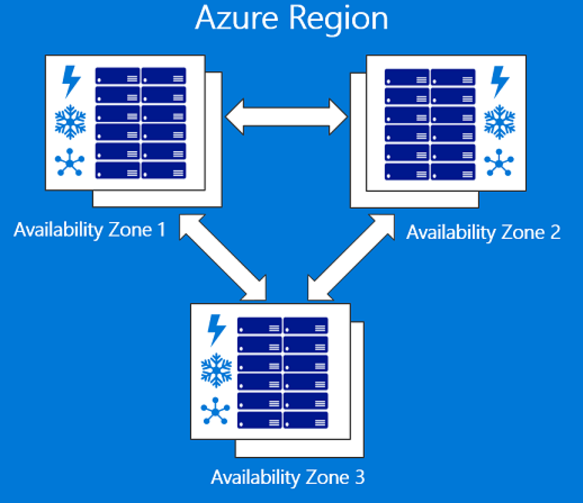
Microsoft has now announced its long pending Availability Zones in each region. It is currently on preview and recommended only for non-critical workload as Micorsoft does not provide any SLA now. With this, you can now provision your workload from different data centers in the same regions for resilience as you will have options to select between minimum of 3 AZs in each region with GA. However, it is now available only on East US2 and West Europe for Preview.

AZ Fig01.png

AWS currently operate 44 AZs across 16 Regions and 14 more AZs are already planned (44+14 =58). Microsoft currently operate in 36 regions and 6 more to come. If you assume that Microsoft will bring 3 AZs minimums at each of these regions, Microsoft would have (36+6) *3= 126 which itself is more than double the size of AZs across the globe. I agree, it does not make much sense to just play with the numbers so Microsoft need to bring the services that would help customers to make use availability zones and add value to their workloads hosted in Azure services. AWS currently offers multiple PaaS services for their Multi-AZ deployment model so Microsoft still need do good job on making sure that more services are available for Multiple AZ deployments.

Continue reading “Availability Zones for Azure, like in AWS.”

Bring Home Azure with Azure Stack

It is not just the public cloud today, but it is Hybrid Cloud.

Microsoft is working on making our hybrid life less difficult by introducing Azure stack. We all know the pain of getting Microsoft System Center integrated and working on-premises to enable private cloud. Yes, I agree with you SC is not a candidate for comparing it with Azure Stack. However, I believe Azure Stack will be solving these issues and bringing cloud to your data center with ‘Pay as You Use’ Pricing model.

What is Azure stack as per Microsoft?

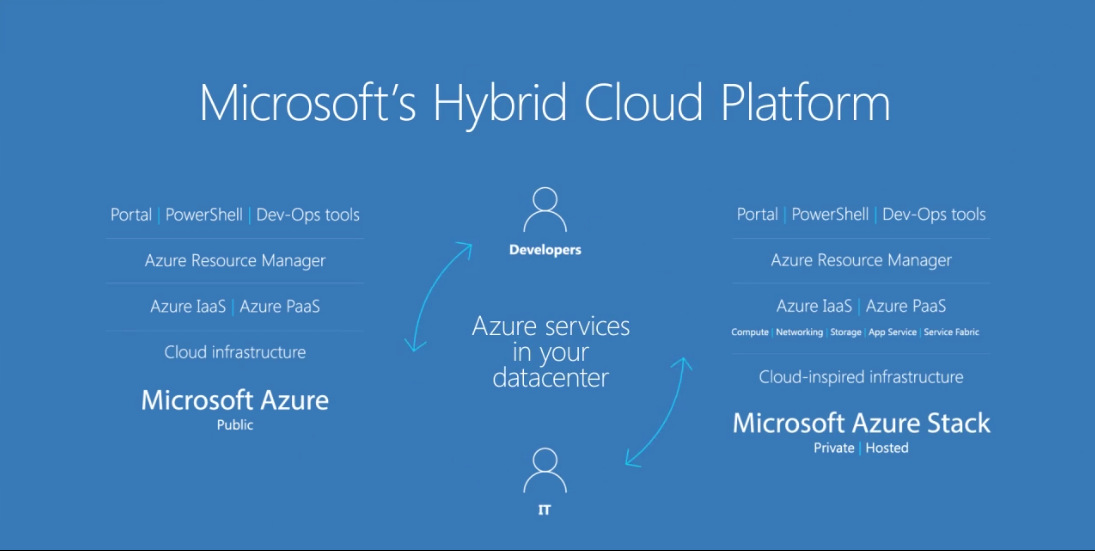
Microsoft Azure Stack is a hybrid cloud platform that lets you deliver Azure services from your organization’s datacenter. Bring the agility and fast-paced innovation of cloud computing to your on-premises environment with Azure Stack. This extension of Azure allows you to modernize your applications across hybrid cloud environments, balancing flexibility and control. Plus, developers can build applications using a consistent set of Azure services and DevOps processes and tools, then collaborate with operations to deploy to the location that best meets your business, technical and regulatory requirements.

Azure Stack

Continue reading “Bring Home Azure with Azure Stack”